

Today's news (WebSDR)
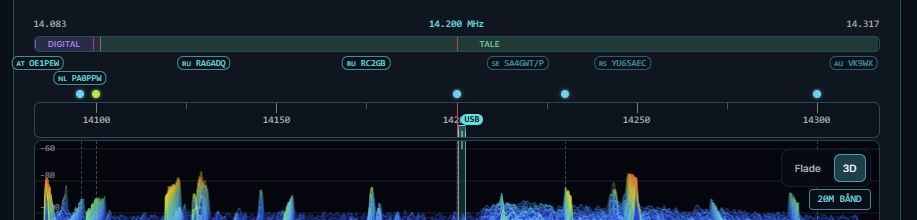
1: Fresh DX spots from the cluster (no more than 30 minutes old) now appear as small markers with flags and callsigns just above the frequency scale on Web-SDR.
 Clipboard_10-19-2026_01
:: Click a marker to tune the radio to that frequency and automatically switch mode (CW, LSB below 10 MHz, USB above 10 MHz and for digital modes).
:: Hover over a marker to see the spotter, country, UTC time and comment.
:: Spots that are close together are arranged in multiple rows so they don't overlap. Spots more than 15 minutes old appear slightly faded.
:: You can toggle this on and off with »DX spots (count)« next to the station selections, and your choice is remembered in your browser.2: The »time machine« on the cassette deck
Clipboard_10-19-2026_01
:: Click a marker to tune the radio to that frequency and automatically switch mode (CW, LSB below 10 MHz, USB above 10 MHz and for digital modes).
:: Hover over a marker to see the spotter, country, UTC time and comment.
:: Spots that are close together are arranged in multiple rows so they don't overlap. Spots more than 15 minutes old appear slightly faded.
:: You can toggle this on and off with »DX spots (count)« next to the station selections, and your choice is remembered in your browser.2: The »time machine« on the cassette deck
 Clipboard_10-19-2026_02
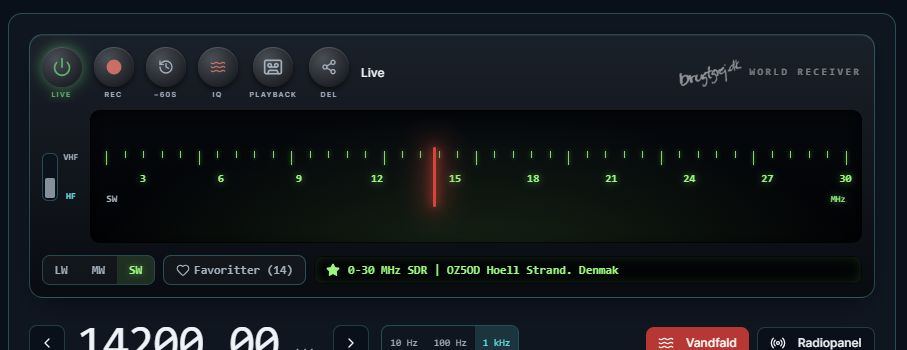
:: There is now a −60s button next to the Rec button on the radio. While you listen live, the radio continuously remembers the last 60 seconds. Pressing the button saves them as a new tape on the shelf with the frequency, mode and UTC time. If you're logged in, the tape is also saved in the cloud for 24 hours. If you've been listening for less than a minute, you just get whatever has come in so far.3: Audio DSP: Notch filter & Noise reduction
Clipboard_10-19-2026_02
:: There is now a −60s button next to the Rec button on the radio. While you listen live, the radio continuously remembers the last 60 seconds. Pressing the button saves them as a new tape on the shelf with the frequency, mode and UTC time. If you're logged in, the tape is also saved in the cloud for 24 hours. If you've been listening for less than a minute, you just get whatever has come in so far.3: Audio DSP: Notch filter & Noise reduction
 Clipboard_10-19-2026_03
:: Next to the AGC buttons you will now find:
::: NR · Off / Mild / Strong: reduces hiss and background noise.
::: Notch on/off: automatically removes constant whistles and carriers.
Your choices are remembered in the browser. The filters only affect what you hear and capture with −60s. The decoders still receive the unfiltered audio.4: Modular rack layout with collapsible panels
Clipboard_10-19-2026_03
:: Next to the AGC buttons you will now find:
::: NR · Off / Mild / Strong: reduces hiss and background noise.
::: Notch on/off: automatically removes constant whistles and carriers.
Your choices are remembered in the browser. The filters only affect what you hear and capture with −60s. The decoders still receive the unfiltered audio.4: Modular rack layout with collapsible panels
 Clipboard_10-19-2026_04
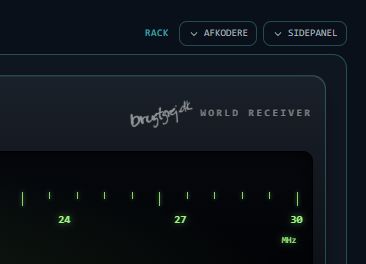
Above the radio on Web-SDR it now says RACK · Decoders · Side panel
:: Decoders collapses the decoders below the waterfall. A decoder that is running keeps running.
:: Side panel hides the right-hand column so the radio and waterfall take up the full width.5: IQ band recording
Clipboard_10-19-2026_04
Above the radio on Web-SDR it now says RACK · Decoders · Side panel
:: Decoders collapses the decoders below the waterfall. A decoder that is running keeps running.
:: Side panel hides the right-hand column so the radio and waterfall take up the full width.5: IQ band recording
 Clipboard_10-19-2026_05
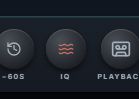
You can now record the entire band.
:: Recording: Press the new IQ button on the radio. It records about 12 kHz of the band for up to 5 minutes. During recording, the receiver stays fixed, but you can still tune within ±5,5 kHz and listen. Press again to stop. The file goes into your Downloads folder.
:: Playback: Under Playback there is now a section for band recordings. Here you can drag the slider and select LSB, USB, CW, AM or FM. This lets you listen to signals other than the ones you heard while recording. You can also reload a saved IQ file.
Band recordings are not saved in the cloud because 5 minutes takes up about 14 MB. They disappear from the list when you close the tab, but the file in Downloads stays there.Enjoy ☀️
Clipboard_10-19-2026_05
You can now record the entire band.
:: Recording: Press the new IQ button on the radio. It records about 12 kHz of the band for up to 5 minutes. During recording, the receiver stays fixed, but you can still tune within ±5,5 kHz and listen. Press again to stop. The file goes into your Downloads folder.
:: Playback: Under Playback there is now a section for band recordings. Here you can drag the slider and select LSB, USB, CW, AM or FM. This lets you listen to signals other than the ones you heard while recording. You can also reload a saved IQ file.
Band recordings are not saved in the cloud because 5 minutes takes up about 14 MB. They disappear from the list when you close the tab, but the file in Downloads stays there.Enjoy ☀️